



Gmail's New Email Authentication Requirements
Google has new requirements for email senders, and they apply to anyone sending more than 5000 emails per day. If you don't meet them, Gmail may not deliver your emails.
This page covers the four requirements and how to meet them with Bento. For the actual DNS setup steps, see the DNS Setup guide.
Authenticate Your Email with SPF and DKIM
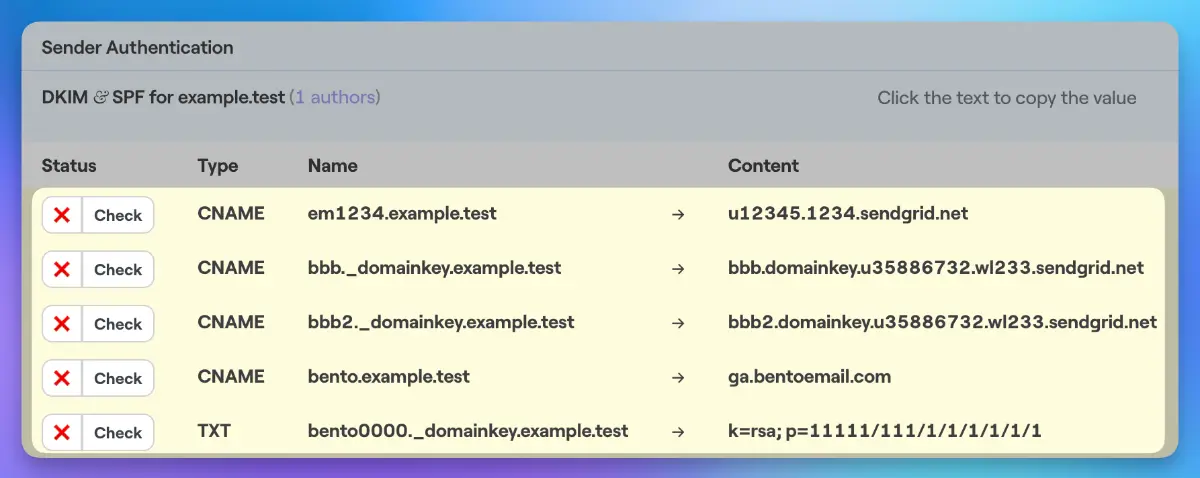
The first requirement is that all senders must authenticate their email using SPF and DKIM. SPF (Sender Policy Framework) is a way to specify which servers are allowed to send email on behalf of your domain. DKIM (DomainKeys Identified Mail) is a way to digitally sign your emails to prove they really came from you. Setting up SPF and DKIM can be a bit technical. But most email service providers (like Bento) make it easy to do with just a few clicks.
Set Up a DMARC Policy
The second requirement is to set up a DMARC policy for your domain. DMARC (Domain-based Message Authentication, Reporting & Conformance) is a way to tell email providers what to do with messages that fail SPF or DKIM checks. You can choose to have these messages rejected outright, or just have the failures reported back to you. Setting a strict DMARC policy can help prevent spoofing and phishing attacks using your domain. But be careful - if you set it to reject messages and you haven't properly authenticated all your legitimate email streams, some of your own emails could get blocked.
Keep Your Spam Rate Under 0.3%
The third requirement is to keep your spam complaint rate under 0.3%. That means for every 1000 emails you send, no more than 3 people should be marking them as spam. You can check your spam rate by signing up for Google Postmaster Tools and adding your domain.

If your spam rate is too high, you may need to do some list hygiene. Remove old, inactive subscribers and anyone who hasn't explicitly opted in to your emails. Spreading out your email volume over a few days can also help keep your spam rate in check.
Enable One-Click Unsubscribe
The final requirement is to enable a one-click unsubscribe option in your emails. This allows Gmail users to easily opt out of your emails without having to visit an external website. Most email service providers (including Bento) support this out of the box, so there's nothing extra you need to do.
Meeting the Requirements
For most legitimate senders, these requirements are reasonable and straightforward to implement. Authenticating your email, setting up DMARC, keeping spam complaints low, and making it easy to unsubscribe are all practices you should be following anyway. Follow the DNS Setup guide to add the required records for your domain.
If you have questions, ask in Discord or contact Bento support.