



Setup Namecheap DNS for Bento
Add Bento's required DNS records in Namecheap to authenticate your domain for email sending. One Namecheap quirk to remember: it auto-appends your domain to Host fields, so enter only the subdomain portion.
Prerequisites
Before starting, ensure you have:
- Access to your Namecheap account
- Your domain registered with Namecheap or using Namecheap DNS
- Required permissions to modify DNS records
Required DNS Records
You'll need to add these 6 DNS records to your domain:
Required DNS Records
  example              CNAME  example.test.sendgrid.net
  bbb._domainkey       CNAME  bbb.domainkey.example.test.sendgrid.net
  bbb2._domainkey      CNAME  bbb2.domainkey.example.test.sendgrid.net
  bento                CNAME  ga.bentoemail.com
  bento3180._domainkey TXT    k=rsa; p=example...
  _dmarc               TXT    v=DMARC1; p=quarantine; adkim=s
System > DNS. The values above are examples - use the actual values provided in your Bento account.- Log into your Namecheap account at namecheap.com
- Navigate to Domain List from the left sidebar
- Find your domain and click Manage
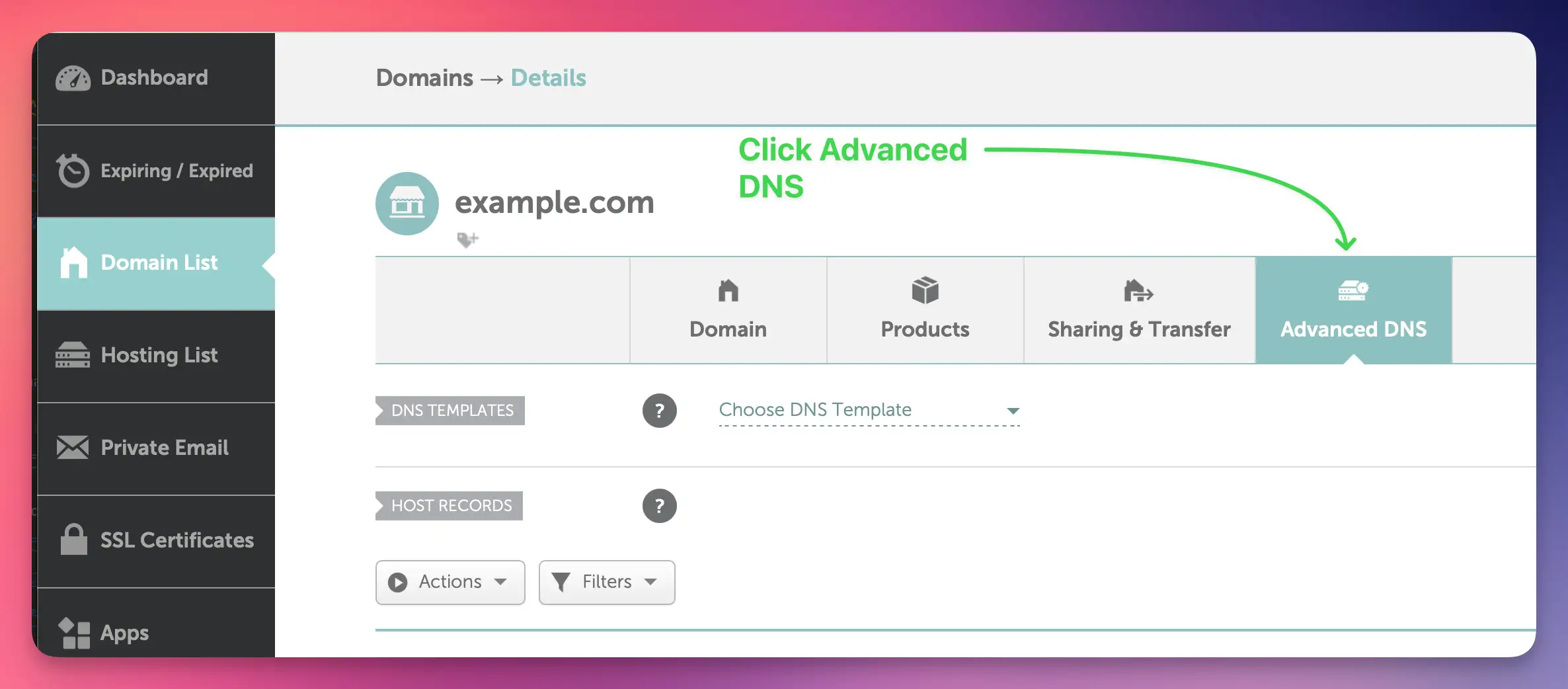
- Click on the Advanced DNS tab
- You'll see the DNS records management interface
You'll need to add 4 CNAME records. Here's how to add the first one:
- Click the Add New Record button
- Select CNAME Record from the Type dropdown
- In the Name field, enter:
example - In the Target field, enter:
example.test.sendgrid.net - Set TTL to Automatic (recommended)
- Click the Save Changes button (green checkmark)
example.yourdomain.com, you only need to enter example. The system will automatically append your domain.Repeat this process for the remaining CNAME records for example:
bbb._domainkey→bbb.domainkey.example.test.sendgrid.netbbb2._domainkey→bbb2.domainkey.example.test.sendgrid.netbento→ga.bentoemail.com
System > DNS in the menu.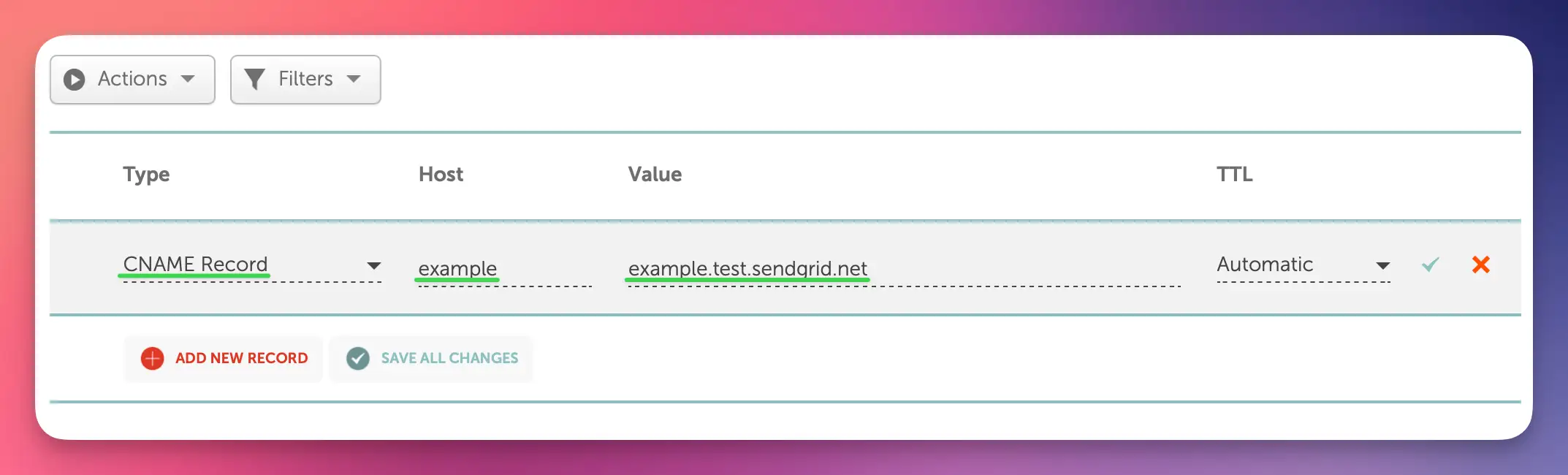
Next, add 2 TXT records. Start with the DKIM record:
- Click the Add New Record button
- Select TXT Record from the Type dropdown
- In the Name field, enter:
bentoEXAMPLE._domainkey - In the Content field, enter the full DKIM key (starts with k=rsa; p=...)
- Set TTL to Automatic
- Click the Save Changes button (green checkmark)
Then add the DMARC record:
- Click Add New Record again
- Select TXT Record from the Type dropdown
- In the Name field, enter:
_dmarc - In the Content field, enter:
v=DMARC1; p=quarantine; adkim=s - Set TTL to Automatic
- Click the Save Changes button (green checkmark)

After adding all 6 DNS records, you need to verify them in Bento:
- Return to Bento and navigate to
System > DNS - Wait 5-10 minutes for DNS propagation (can take up to 48 hours in some cases)
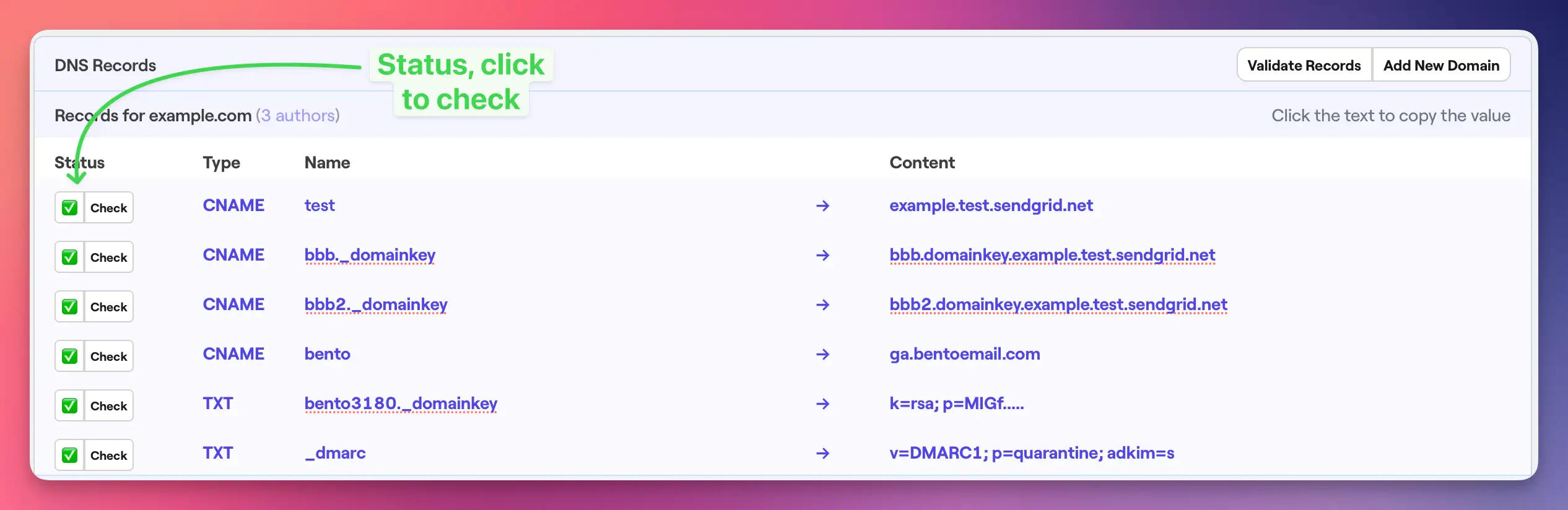
- Click the Check button next to each DNS record
- Properly configured records will show a green checkmark and blue text
- If any records fail verification, double-check the values and TTL settings
Once complete, your Namecheap DNS records should be as follows:
All 6 records should be visible in your DNS management interface with:
- 4 CNAME records with proper Host and Value fields
- 2 TXT records with proper Host and Value content
- All records showing TTL as "Automatic"
- Green checkmarks indicating saved status
Namecheap Notes
- Domain Auto-Append: Namecheap automatically appends your domain to Host fields, so only enter the subdomain portion
- Save Changes: Always click the green checkmark after adding each record to save changes
- TTL Options: Namecheap offers "Automatic" TTL which is recommended for most use cases
- Propagation: Namecheap DNS changes typically propagate within 30 minutes to 4 hours
Troubleshooting
If you encounter issues:
- Records not verifying: Double-check that all values match exactly what's shown in your Bento account
- Host field confusion: Remember that Namecheap auto-appends your domain - only enter the subdomain part
- Unsaved changes: Ensure you clicked the green checkmark to save each record
- DNS propagation: Wait up to 48 hours for global DNS propagation
- TTL settings: Use "Automatic" TTL for optimal performance
Next Steps
Once all DNS records are verified in Bento:
- Your domain is now authenticated for email sending
- You can start sending emails with improved deliverability
- Monitor your email performance in the Bento dashboard
If you have any questions, feel free to ask in the Bento Discord!