



Bento Laravel Guide
This guide covers installing the Bento Laravel SDK, configuring the client, and the main operations: tracking events, managing subscribers, and sending transactional emails from your Laravel application.
Reference
Installation
Install the Bento Laravel SDK in your project:
Basic Setup
To initialize the Bento client, you'll need your Site UUID, Publishable Key, and Secret Key from your Bento account.
You can find your keys in your Bento Team. To see your keys, click
Your Private API Keys. If you do not see a Publishable key and Secret Key, click Generate Key to
create a set.
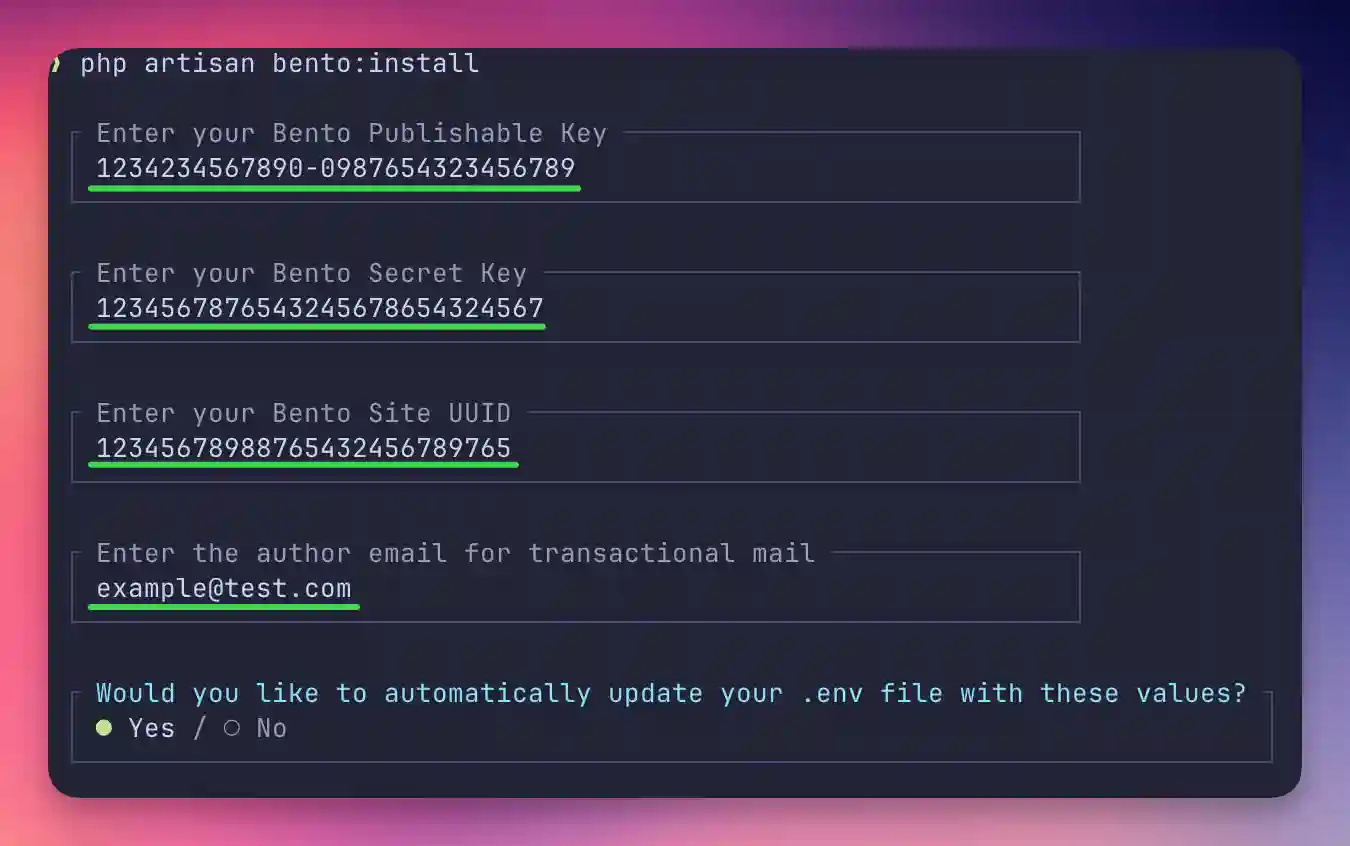
Easy installation with the bento:install Artisan command:
You will be prompted for:
- Your Bento Publishable Key
- Your Bento Secret Key
- Your Bento Site UUID
- The author email for transactional mail
- Whether you want to automatically update your
.envfile
If you decline automatic .env modification, the command will display the required environment variables for you to copy and add manually. You will also see links to the Bento Laravel documentation and the Bento app.
The install command uses Laravel Prompts for a modern, interactive setup experience. This requires Laravel 10+ and PHP 8.2+.
Manual installation:
Tracking Your First Event
Events record actions users take in your application, like signing up or making a purchase.
Adding subscribers via events
Events are the preferred way to add subscribers. One call records the event and kicks off any workflows and automations tied to it.
Enriching events with data
Events can carry contextual data alongside the action itself. This can be used in emails via liquid tags or in segmentation. For instance, when recording a purchase event, you can include detailed transaction information such as:
| Detail | Liquid tag |
|---|---|
| Product details | |
| Purchase amount | |
| Transaction ID | |
| Payment method |
Practical Example
When a customer completes a purchase, you can track this as an event while including all relevant purchase details. This approach enables you to:
- Trigger specific post-purchase workflows
- Launch targeted follow-up automations
- Track lifetime value (LTV) metrics
- Create personalized communications based on purchase history
Managing Subscribers
If you need to manage subscribers directly there are a set of convenience methods available to you. Add, update, and
unsubscribe subscribers with these simple methods. Currently, you cannot remove subscribers via the API, but you can
remove them from the dashboard People > All Users.
Adding Individual Subscribers
Please note, while these methods make it easy to manage a subscriber, the Bento recommended way to add a subscriber
is via an event. This allows you to kick off sequences and automations, while also recording the "event" at the same
time (1 API call).
Adding Multiple Subscribers
Importing or modifying multiple subscribers should be handled via the bulk methods, instead of looping over these calls multiple times.
Convenience Methods
The SDK provides a set of simple convenience methods that wrap common operations into single-call functions. These are ideal for quick integrations where you need to perform a single action without constructing DTOs manually.
trackEvent(),
importSubscribers(), subscriberCommand()).Common Use Cases
Here are some common scenarios with ready-to-use code:
Custom Fields and Tags
Bento allows you to store custom data about your users through fields and segment them with tags:
Using Custom Fields & Tags
While custom fields and tags can be used to segment subscribers, most Bento users find that namespaced tags provide a more effective and easier-to-maintain solution for most segmentation use cases.
Namespaced Tags
Namespaced tags follow this format: namespace:detail
For example, if you offer three subscription plans, you could create these tags:
subscription:basicsubscription:prosubscription:enterprise
We recommend applying these tags either through an automated flow or via bulk updates.
Fields
Fields are perfect for storing information about your subscribers, such as their language, timezone, or other relevant details. By using fields, you can easily segment subscribers based on their specific needs and preferences, allowing you to tailor your marketing efforts and messaging to each group.
The primary difference between fields and namespaced tags is that fields are not limited to a specific detail and do not need to be predefined. You can store any type of data in a field, including strings, numbers, or even objects. This flexibility makes fields a powerful tool for storing data.
Best Practices
For optimal organization, consider using tags for segmentation while storing more detailed user information in custom fields. Many successful implementations use a strategic combination of both approaches.
Tracking Purchase Events
When recording purchase events, you must include a unique: key as part of the tracking data. This requirement prevents
duplicate transactions from being recorded in your analytics.
Most users find it beneficial to use their internal cart or order number as the unique: key. This approach simplifies
future lookups and maintains consistency across your systems. The unique: key value you provide is accessible through
liquid tags when creating custom email templates, allowing for personalized transactional messaging based on specific
purchase details.
Tracking purchases is a great way to monitor customer lifetime value (LTV) and identify recurring customers. Bento reports on the LTV of each subscriber, allowing you to identify high-value customers and tailor your marketing efforts accordingly.
Laravel Middleware
The Bento SDK includes a Laravel middleware that automatically strips UTM tracking parameters from signed URLs. This is particularly useful for email flows such as sign-up, password reset, or other secure actions where the integrity of the signed URL is critical.
By default Bento appends UTM codes (e.g., utm_source, utm_medium, utm_campaign, etc.) to links in emails for analytics. When these are added to a signed URL, they can invalidate the signature, resulting in Laravel rejecting the request.
This middleware helps prevent that by cleaning the request before signature verification occurs.
Depending on the version of Laravel you are using, there are a couple ways you might configure your application to use the middleware.
Example signed urls
- https://example.com/password/reset/token?expires=1679363200&signature=xxxxxxxxxxxx
- https://example.com/email-verification?expires=1699999999&signature=abc123def456
Laravel < 10
In Laravel < 10, you can add the middleware to the app/Http/Kernel.php file:
Laravel >= 11
In Laravel >= 11, you can add the middleware to the bootstrap/app.php file:
Applying the Middleware
Once you have added the middleware, you can apply it to any routes that require signed URLs. For example, if you have a route that requires a signed URL for a password reset, you can add the middleware to that route:
Broadcasts
Broadcasts allow you to send one-time email campaigns to segments of your subscribers. You can retrieve existing broadcasts or create new ones programmatically.
type parameter accepts BroadcastType::PLAIN or
BroadcastType::RAW. Plain broadcasts use Bento's template system, while raw broadcasts
send the HTML content as-is.Email Templates
Manage your email templates programmatically. Retrieve template details or update the subject line and HTML content of existing templates.
subject or html must be provided.
You can update either independently without affecting the other.Batch Operations
For efficiency, we suggest using batch operations when integrating with Bento. These methods allow for single or bulk operations on subscribers and events, improving the performance and scalability of your integration. They also cover more than 80% of the API use cases for most customers.
Sequences
Sequences are automated email series that subscribers progress through over time. You can list all sequences and add new emails to existing sequences programmatically.
getSequences() method supports pagination. Pass a page number to navigate
through large sets of sequences.Workflows and Forms
Retrieve your configured workflows and form responses to integrate automation data into your application.
getWorkflows() and getSequences() support pagination through an optional
page parameter.Statistics
Retrieve analytics data for your site, segments, and reports. These are useful for building dashboards or monitoring engagement metrics programmatically.
Transactional Emails
Bento allows you to send personalized transactional emails for time-sensitive, direct communications. These emails serve specific functional purposes rather than marketing objectives.
Ideal Transactional Email Use Cases
- User onboarding (confirmation etc)
- Password reset notifications
- Sign-in verification links
- Order confirmations and details
- Account notifications
NOT Ideal Transactional Email Use Cases
- CC / BCC recipients
- Emails that require an attachment (we suggest always using links for emails for best deliverability)
- Marketing of any kind
- Promotional content
- Newsletters
From Address Requirements
The sender address used in your transactional emails must be configured as an Author email within your Bento settings.
Please note that generic addresses such as "no-reply@domain.com" or similar non-personal
addresses are not currently supported.
Important Distinction
Transactional emails are designed for essential communications that facilitate specific user actions or provide critical information.
Subscriber Updates
Many organizations joining Bento already have an established subscriber base that requires bulk updates over time. These updates commonly include setting field data and managing tags across multiple subscribers. We recommend these methods for all subscriber updates, single or bulk.
Choosing the Right Update Method:
The SDK offers multiple approaches for creating subscribers in Bento, each suited to different scenarios.
Preferred Method: Events
The recommended way to create subscribers is via events in response to user activity. This approach activates automations, workflows, and can contain data enrichment.
Alternative Methods
For scenarios where you need to create subscribers independently of user actions:
Use this method when you need to quickly create a single subscriber with minimal data:
For creating multiple subscribers or including additional fields:
Best Practices for Batch Imports:
- Though the API supports up to 1,000 subscribers per call, we recommend batches of 200-300 for optimal performance when dealing with extensive data.
- Include all relevant custom fields in the initial import to minimize follow-up updates.
- For very large imports (10,000+ subscribers), consider implementing a queue system with delay between batches.
Updating Subscribers
Depending on your requirements, several approaches are available for updating subscriber information.
Event-Based Updates (Preferred)
When updates occur in response to user actions, tracking events is the recommended approach:
Alternative Update Methods
For updates outside of user-triggered actions:
For quickly updating a specific attribute on a single subscriber:
For updating multiple subscribers or multiple fields at once, use the batch import method:
Recommendations:
- Even for single-subscriber updates, consider using the batch import method when multiple fields need updating.
- The batch import performs an "upsert" operation. It creates subscribers that don't exist and updates those that do.
- This approach provides the most flexibility as your use cases evolve, whether you need to add more changes or modify multiple users simultaneously.
Specialized Update Operations
For specific update scenarios, the SDK offers dedicated methods:
Utility Features
These utilities handle common secondary use cases like email validation and blacklist checks.
Artisan Commands
The SDK provides Artisan commands for common tasks.
bento:validate
The bento:validate command tests your API configuration by running validation checks
against all endpoints. This is useful for verifying your setup after initial installation
or when debugging connectivity issues.
--skip-write in production environments to avoid creating test data while
still validating read endpoints.Core API
- Bento Facade - Main entry point for using the SDK (
Bentonow\BentoLaravel\Facades\Bento) - Configuration - Set up through Laravel's config system (
config/bentonow.php) - Service Provider - Automatically registered via Laravel's package discovery
- Data Transfer Objects - Structured request data classes in
Bentonow\BentoLaravel\DataTransferObjects - Laravel Mail Integration - Use the Bento transport with Laravel's Mail facade
Convenience Methods
Core API
| Use Case | Laravel SDK Method |
|---|---|
| Add a new subscriber | |
| Unsubscribe a subscriber | |
| Update data for an existing subscriber | |
| Add a tag to a subscriber | |
| Update subscriber fields | |
| Track a custom event | |
| Track a purchase event | |
| Find a subscriber | |
| Upsert a subscriber | |
| Tag a subscriber (convenience) | |
| Remove a tag (convenience) | |
| Add a subscriber (convenience) | |
| Remove a subscriber (convenience) | |
| Update fields (convenience) | |
| Track a purchase (convenience) | |
| Track a custom event (convenience) |
Modules
Batch
| Use Case | Method | API Reference |
|---|---|---|
| Import multiple subscribers | Import Subscribers | |
| Import multiple events | Import Events | |
| Send emails | Send Emails |
Commands
| Use Case | Method | API Reference |
|---|---|---|
| Add a tag | Subscriber Upsert | |
| Remove a tag | Subscriber Upsert | |
| Add a field | Subscriber Upsert | |
| Remove a field | Subscriber Upsert | |
| Subscribe a user | Subscriber Command | |
| Unsubscribe a user | Subscriber Command | |
| Change email address | Subscriber Command |
Experimental
| Use Case | Method | API Reference |
|---|---|---|
| Validate email address | Validate Email | |
| Predict gender from name | Gender Guess | |
| Get IP geolocation | IP Geolocation | |
| Check domain/IP blacklist | Blacklist Check | |
| Check content moderation | Content Moderation |
Fields
| Use Case | Method | API Reference |
|---|---|---|
| Get all fields | Get Fields | |
| Create a field | Create Fields |
Subscribers
| Use Case | Method | API Reference |
|---|---|---|
| Find subscriber | Find Subscriber | |
| Create a subscriber | Create Subscriber | |
| Run commands | Subscriber Commands |
Tags
| Use Case | Method | API Reference |
|---|---|---|
| Get all tags | List Tags | |
| Create a tag | Create Tag |
Broadcasts
| Use Case | Method | API Reference |
|---|---|---|
| Get all broadcasts | Get Broadcasts | |
| Create a broadcast | Create Broadcast |
Email Templates
| Use Case | Method | API Reference |
|---|---|---|
| Get email template | Get Template | |
| Update email template | Update Template |
Sequences
| Use Case | Method | API Reference |
|---|---|---|
| Get all sequences | Get Sequences | |
| Create sequence email | Create Sequence Email |
Workflows
| Use Case | Method | API Reference |
|---|---|---|
| Get all workflows | Get Workflows |
Forms
| Use Case | Method | API Reference |
|---|---|---|
| Get form responses | Get Form Responses |
Statistics
| Use Case | Method | API Reference |
|---|---|---|
| Get site stats | Site Stats | |
| Get segment stats | Segment Stats | |
| Get report stats | Report Stats |
Common Errors
| Not Authorized | Check your API keys and ensure they have appropriate permissions |
| Rate Limited | Implement backoff/retry logic for batch operations |
| Network Errors | Check internet connectivity and API endpoint availability |
| Exceptions | Double check you are using a valid Author & the payload format. |
Debugging Tips
| 1. | Check Laravel's log (storage/logs/laravel.log) for detailed error output |
| 2. | Use try/catch blocks around API calls to handle errors gracefully |
| 3. | For batch operations, start with smaller batches to isolate issues |